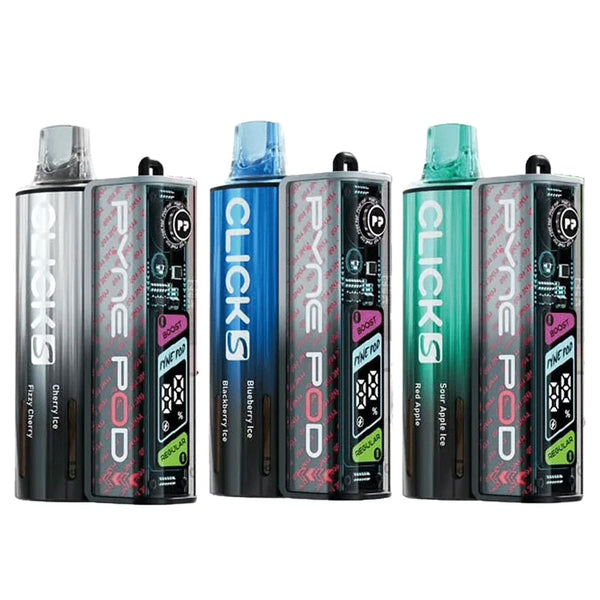
Pyne Pod Click S 30K Prefilled Pod Kit
Regular price
£10.99
Sale price
£10.99
Regular price
Brand:PYNE POD
Buy Now Free Vape Delivery Over £30
 Excellent Rating On Trustpilot
 Live Chat Support
 Best Vape Online Store UK
 Lowest UK Prices
 Order Before 4pm* Same Day DispatchFree Vape Delivery Over £30Excellent Rating On TrustpilotLive Chat SupportBest Vape Online Store UKLowest UK PricesOrder Before 4pm* Same Day DispatchFree Vape Delivery Over £30Excellent Rating On TrustpilotLive Chat SupportBest Vape Online Store UKLowest UK PricesOrder Before 4pm* Same Day DispatchFree Vape Delivery Over £30Excellent Rating On TrustpilotLive Chat SupportBest Vape Online Store UKLowest UK PricesOrder Before 4pm* Same Day DispatchFree Vape Delivery Over £30Excellent Rating On TrustpilotLive Chat SupportBest Vape Online Store UKLowest UK PricesOrder Before 4pm* Same Day DispatchFree Vape Delivery Over £30Excellent Rating On TrustpilotLive Chat SupportBest Vape Online Store UKLowest UK PricesOrder Before 4pm* Same Day DispatchFree Vape Delivery Over £30Excellent Rating On TrustpilotLive Chat SupportBest Vape Online Store UKLowest UK PricesOrder Before 4pm* Same Day DispatchFree Vape Delivery Over £30Excellent Rating On TrustpilotLive Chat SupportBest Vape Online Store UKLowest UK PricesOrder Before 4pm* Same Day DispatchFree Vape Delivery Over £30Excellent Rating On TrustpilotLive Chat SupportBest Vape Online Store UKLowest UK PricesOrder Before 4pm* Same Day Dispatch
by Azim Aleem

 The Pyne Pod Click range was built to feel as close to a disposable as possible, just rechargeable and refillable. Even so, a few small steps trip people up the first time, especially around fitting a new pod or switching modes.
This guide covers the full process for the Click 10K, Click S 30K, and Click 50K, since all three use the same click-to-connect system underneath slightly different builds.
Every Pyne Pod Click kit follows the same basic format, just with different quantities depending on which one you've bought.
Click 10K — one device, one 2ml pod, one 10ml refill container
Click S 30K — one device, two 1ml pods, two 8ml refill containers, twist mouthpiece
Click 50K — one device, three 2ml pods, three 10ml refill containers
All three come prefilled with 20mg nicotine salt e-liquid, so there's nothing to fill yourself at any point.
Getting started takes a couple of minutes. Here's the full process:
Unbox everything. Take the device and pods out of their packaging and lay them out in front of you.
Remove all rubber plugs. Every pod and refill container ships with small protective plugs covering the connection points. These need to come off fully before anything will click into place.
Charge the device first. If it's brand new, give it a short charge via USB-C before your first use, even if the battery shows some charge already.
Slot the pod into the device. It should sit in with a light click. Don't force it; if it's not seating properly, check it's the right way round.
Click the refill container in underneath. This is what feeds e-liquid into the pod automatically.
Let it sit for a minute. Give the coil time to fully saturate before your first puff. Skipping this step is the most common reason for a dry or burnt first draw.
Inhale to activate. There's no fire button. Just draw on the mouthpiece the same way you would with a disposable.
Once you've done this once, every future pod swap takes seconds.
"Refill" is a bit of a misleading word here. You're not topping anything up by hand, you're swapping in fresh, sealed components.
Here's the process when a pod runs dry:
Pull out the empty pod and container together. They're designed to be replaced as a pair, not topped up individually.
Do not attempt to open or refill the container yourself. These are closed systems, and trying to force them open can cause leaks or damage the device.
Click a fresh pod into place, followed by its matching refill container underneath.
Give the new pod a minute to saturate before vaping normally again.
A few things worth keeping in mind:
Store spare pods and containers upright where possible, just to avoid any unnecessary mess before you've even opened them.
If you own a Click 50K, you'll cycle through all three pod sets before needing a fresh multi-pack.
If you own a Click S 30K, both pods in a pack tend to run down at different rates depending on which flavour you favour, so don't be surprised if one needs replacing before the other.
Brand:PYNE POD
Buy NowCharging is identical across all three kits, thanks to USB-C.
Charging speed varies slightly by kit:
Most vapers get a full day of regular use from a single charge across all three devices, so this isn't something you'll need to think about constantly.
All three kits offer two power settings, and switching between them takes seconds.
Here's the difference in practice:
There's no wrong choice. Most vapers default to Regular Mode day-to-day and switch to Boost when they fancy something stronger.
If you own the Click S 30K specifically, there's one extra feature worth knowing how to use properly.
This feature is exclusive to the Click S 30K. If you use Click S 30K pods in a Click 10K or Click 50K, both pods will still fire, but the kit will only draw from whichever one it reads first, since the twist mechanism isn't present on those devices.
Once you've been through the process once, using any kit in the Pyne Pod Click range becomes second nature. There's no manual to memorise and no ongoing maintenance routine beyond swapping a pod and container when they run dry.
Insert, charge when needed, pick your power mode, and twist between flavours if you've gone for the S 30K. That's the entire relationship you'll have with the device, making Vape Gala a convenient place to explore your next vape.

At VapeGala, our digital initiatives are spearheaded by Azim Aleem. With extensive experience in the vaping sector, Azim's approach is shaped by his own successful transition from smoking. This personal journey greatly assists him in promoting vaping's benefits. Further, he gained real-time insights into user preferences and market dynamics as a frontline vape consultant. Now he is utilising his hands-on understanding and digital marketing prowess to empower others toward a smoke-free future.
Shopping Cart
