


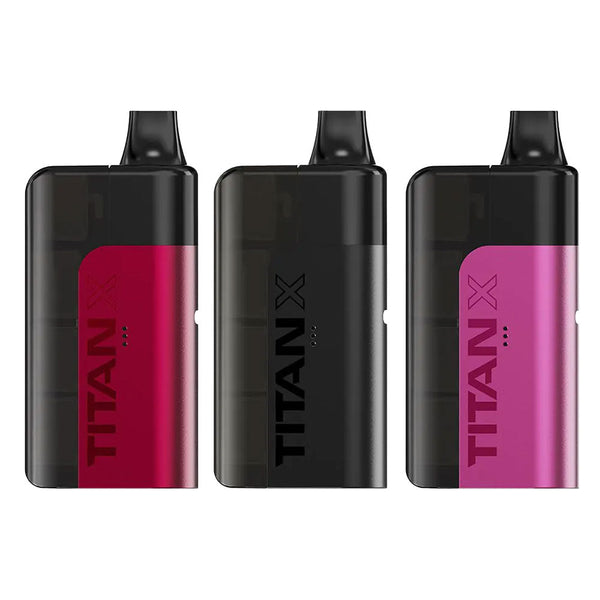
Titan X Prefilled Pod Kit
Brand:Titan
Buy NowWhat's in the Box
Before setting anything up, it helps to know what you're working with. A standard Titan X Prefilled Pod Kit includes:
- 1 × Titan X device with built-in 1000mAh battery
- 1 × 2ml prefilled pod with mesh coil
- 3 × 5ml refill capsules, prefilled with 20mg nic salt e-liquid
Note that a USB-C charging cable isn't always included, so it's worth checking your order before assuming you've got one ready to go.
How to Use the Titan X Pod Kit: Step-by-Step Setup
Setting up and getting started with a Titan X pod kit should not take long. It is a fairly simple device for a prefilled pod kit. Here's the full process of using the Titan X, from unboxing it to the very first puff:
- Unbox everything. Take the device body, pod, and capsules out of their packaging and lay them out in front of you.
- Remove the silicone plugs. The pod will have small rubber stoppers and a protective sticker over the connection points. Remember to peel these off fully before inserting it.
- Slide the pod into the device. When you slot it in, you should hear a light click. If it’s not going smoothly, don’t force it. Check the pod to see if it is the right way round.
- Attach a refill capsule. Take one of the three 5ml capsules and twist it onto the side of the pod until it locks into place.
- Reattach the side casing. After securing the pod in its place, slide the magnetic cover back over the connection. It will seal everything in place.
- Give it a moment. Set the device aside for around 60 seconds so the coil has time to fully saturate with e-liquid. If you skip this step, you might get a dry first puff.
- Inhale to activate. You don’t need to press any buttons to bring it to life. Just place the mouthpiece between your lips and draw the same way you would with a disposable.
That's genuinely the whole process. Once you've done it once, every capsule swap afterwards takes seconds.
How to Refill Titan X Pod Kit
"Refill" is a slightly misleading word here, since there's no dripping or pouring of e-liquid involved. It's closer to a swap than a refill in the traditional sense.
Here's how it works when a capsule runs dry:
- Slide off the magnetic casing on the side of the device.
- Twist off the empty capsule and put it aside for recycling.
- Twist on a fresh 5ml capsule from your remaining stock.
- Replace the casing and you're ready to start vaping again.
What makes this prefilled pod kit sustainable is the fact that the device itself is reused and keeps working across multiple capsules. You'll typically get through all three included refills before the pod itself needs replacing, at which point a fresh Titan X Prefilled Pod Kit refill pack will have you sorted.
A couple of things worth keeping in mind:
- Don't remove the pod itself until it's completely empty. Doing so early can cause leaking.
- Keep spare capsules stored upright where possible, just to avoid any unnecessary mess before you've even opened them.
How to Charge Titan X Vape
When it is time to charge your Titan X, you can simply use its fast USB-C charging port.
- Locate the charging port on the base of the device.
- Connect a USB-C cable.
- Plug the other end into a USB power source, such as a wall adapter or laptop.
- Watch the LED display for a charging indicator, which will typically show battery percentage or a charging animation.
- Unplug once fully charged. A full charge from empty tends to take around 30 minutes, though this can vary depending on your power source.
How to Switch Titan X Boost Mode
One of the more useful features on this kit is the choice between two power settings/modes. It is quick and easy to switch between the two. Here’s how to do it:
- Locate the mode button on the device, situated next to the LED display.
- Press to toggle between Eco Mode and Boost Mode.
- Check the display to confirm which mode you are currently in.
Here's how the two modes of Titan X differ in practice:
- Eco Mode is the everyday setting. It's gentler on both battery and e-liquid, and it's the better choice if you're after longevity over intensity.
- Boost Mode increases power output, which means denser vapour and a stronger flavour hit. It's ideal for when you fancy a bit more from your draw, though it will use up e-liquid and battery life a little faster.
Common Titan X Prefilled Kit Troubleshooting Tips
Even with a simple pod kit like the Titan X, you can still face a few small issues. Here's how to deal with the most common problems:
- Dry or burnt-tasting hits: Dry hits mean the coil hasn't fully saturated. After installing a fresh pod, let it sit for a minute before vaping.
- No vapour at all: If the kit isn’t producing any vapour, check if the pod is seated correctly and the capsule is twisted on fully. A loose connection can stop e-liquid from feeding through.
- Battery draining faster than expected: Boost Mode uses more power, so switching back to Eco Mode between sessions can help stretch out charge life.
- Leaking around the casing: In case of any leaking, double-check the magnetic cover is properly seated and that the pod wasn't removed before it was fully empty.
Where to Get Your Titan X
If you don't already have a kit and want to try this process for yourself, it's worth comparing retailers before you buy. Head over to shop the Titan Vape range to see the full lineup, including the higher-capacity 50K version if you're after even longer between changes.
Alternatively, you can buy prefilled kits online directly through Vape Gala, with same-day dispatch on orders placed before the daily cut-off. And if big, long-lasting puff counts are what you're after generally, it's worth taking a look to shop big puff vapes and see how the Titan X compares against the rest of the category.

